A monitor light bar lights the work surface from above the screen; it is not the same thing as a strip behind the monitor. Compare the front light, rear effects, controls, mounting and power requirements separately before choosing a Yeelight model.
Task light, background light and a desk lamp
For paperwork and a keyboard, look at where the front light falls. For colour behind the screen, look for a rear-light feature or a separate ambient light. A desk lamp offers different positioning and may be easier to aim over a drawing or a second work area. Neither format automatically eliminates screen reflections: check the result from your normal seated position.
If a separate lamp suits your workspace better, browse our desk lights; for colour effects around a gaming setup, see gaming lighting.
Compare the three current light-bar models
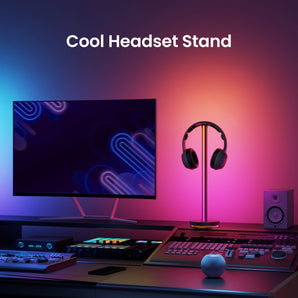
Pura Lite is the manual-control choice for everyday front lighting. Pura Pro adds an automatic brightness sensor and connected controls. Screen Light Bar Pro combines front task light with rear RGB lighting, a wireless dial and Razer Chroma/Overwolf integration. Pura Pro and Screen Light Bar Pro have different connectivity; check voice-assistant support on the exact model, not the shared “Pro” name.
Check the mount and power before installation
Measure the monitor bezel and inspect the clamp position, screen curvature and webcam clearance. A product described for curved screens still needs a suitable mounting surface. Follow the exact power requirement: a USB-shaped socket does not prove that a monitor or computer port can supply enough power. The Screen Light Bar Pro listing identifies a USB-cable-only package, so check what separate power equipment you need.
Choose by the job, not a headline brightness figure
Use Pura Lite when you want simple local adjustments, Pura Pro when automatic adjustment or connected control matters, and Screen Light Bar Pro when rear RGB and supported PC integrations are the priority. Lux figures depend on measurement distance and position; comparing isolated numbers without the test conditions can be misleading. None of these distinctions is a promise of medical eye protection or improved gaming performance.
Related choices and guides
Frequently asked questions
Will a monitor light bar fit every monitor?
No. Check the exact clamp, bezel, curvature and webcam arrangement before choosing. Do not assume universal fit from a photograph.
Does USB power mean an adapter is included?
No. Check the package contents and power requirement. Screen Light Bar Pro is listed with a USB cable only.
Does game sync mean automatic TV picture matching?
No. Razer Chroma or Overwolf integration is different from a dedicated TV picture-sync system. Check the exact software and supported content.
Which model has automatic brightness control?
Pura Pro is the model in this comparison with an automatic brightness sensor. Pura Lite is the simpler manual-control option.
Where should I check warranty terms?
Read the Saudi store terms for the exact product rather than importing warranty or returns promises from an international review.