Smart LED strip: what to choose and how to install it
To pick a Yeelight smart LED strip in Saudi Arabia, compare Light Strip Pro and Obsid RGBIC: Pro emphasises Wi-Fi with no hub, HomeKit and Razer with longer extension; Obsid emphasises pixel RGBIC, Matter and screen sync. Both are trimmable and need a Standard pack with a control box.
Why a smart LED strip?
A smart strip wraps behind a TV, under furniture or along a wall for colour, schedules and sync. The Smart LED Strip collection lists both models. We are the official provider of Yeelight products in Saudi Arabia; products carry a 2-year agent warranty.
Light Strip Pro vs Obsid
| Feature | Light Strip Pro | Obsid RGBIC |
|---|---|---|
| Colours | 16 million; addressable | 16 million RGBIC; pixel-level control |
| Whites | Dimmable multi-scene | Tunable whites for daily use |
| Sync | Music; Razer Chroma | Music, screen colours, games |
| Assistants / Matter | HomeKit, Google, Alexa | Matter for apps and voice |
| Hub | Built-in Wi-Fi; no hub required | Works with Matter; details on product page |
| Trim & extend | To 32.8 ft; up to 8 extensions / Standard | To 16.4 ft; up to 3 extensions / Standard |
| Base look | — | Sleek black base for dark gadgets |
How to install (general steps)
- Buy a Standard pack (with control box) first — extensions alone are not enough.
- Clean and dry the surface before sticking.
- Lay the strip on a flat path; cut only at marked cut points in the instructions.
- Connect the control box and power as in the product guide.
- Pair the app and follow Wi-Fi or Matter setup for your model.
For detailed steps, follow the in-box guide.
Where to use it
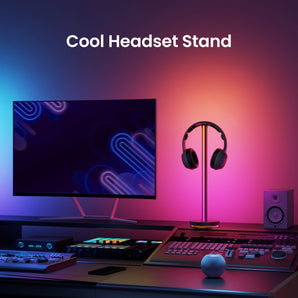
- Behind a TV or monitor with PC Monitor Lights.
- Gaming rooms with Gaming Lighting.
- Living room or bedroom décor with bedroom lighting.
Frequently asked questions
What is the difference between Light Strip Pro and Obsid?
Strip Pro offers built-in Wi-Fi with no hub, HomeKit/Google/Alexa, music sync and Razer Chroma, and extends to 32.8 ft with up to 8 extension packs per Standard. Obsid offers pixel-level RGBIC, music/screen/game sync and Matter, and extends to 16.4 ft with up to 3 extensions per Standard.
Can I cut the strip?
Yes — both models are trimmable and extendable. Cut only at the approved cut marks in the product instructions.
Do I need a Standard pack?
Yes for both models: include at least one Standard pack with a control box. Extension packs alone are not enough.
Does Strip Pro need a hub?
No. Light Strip Pro sets up over built-in Wi-Fi with no hub required.
Does Obsid support Matter?
Yes. Obsid is compatible with Matter for apps and voice control.
Is there a warranty?
Yes — a 2-year agent warranty.