
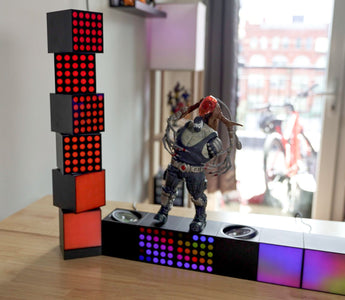
Yeelight Cube is a modular tabletop lighting family with Matrix, Panel and Spot formats. Choose the visual role first, then check whether the selected variant includes the base or is an extension that needs one.
Three different visual roles
| Module | Role to compare |
|---|---|
| Matrix | A pixel-style face for patterns |
| Panel | A broader illuminated face for a colour area |
| Spot | A more directed accent |
Base variants and extensions are not the same purchase
The local catalog lists Cube + Base and extension variants for these module types. An extension needs the compatible base/control equipment and is not an independent starter lamp. Confirm the exact variant before planning the assembly. Check the module-count and power limits in the instructions for your actual Cube kit rather than relying on another lighting family.
Plan the tabletop arrangement
Check the footprint, power route and view from the chair before arranging the modules. The magnetic modular connection supports the product’s intended assembly, not an improvised wall attachment. Leave access to the controls and inspect the effect with the monitor on so that a bright face does not reflect into the display.
Check effects as a separate requirement
The manufacturer describes app-selected effects and supported computer-software integration. Confirm the current setup and compatibility for the feature you intend to use. This does not establish that a Cube assembly directly reads any television image or works with every console, and it does not turn a colour accent into task lighting for the whole desk.
Frequently Asked Questions
Can I start with an extension only?
No. Choose the required compatible base/control equipment; an extension is not a complete starter lamp.







