Gaming lighting: how to set up your room with Yeelight
To light a gaming room, layer a backdrop (strips or panels), a desk layer (Beam, Cube or a monitor bar), then accents such as Cube Lite. The Gaming Lighting collection groups the models available in this store.
Lighting layers for a game room
- Backdrop: LED strip or panels on the wall behind the screen.
- Desk: Beam, Cube or a monitor light bar for task light plus RGB.
- Accents: Cube Lite or D2 on the edge of the desk.
At Yeelight, we are the official provider of Yeelight products in Saudi Arabia; products carry a 2-year agent warranty.
Quick comparison of gaming products
| Product | Form | Sync | Notes |
|---|---|---|---|
| Beam RGBIC | Dual bars + headset stand | Music, screen colours, games | 3-sided light; app & voice control |
| Cube | Modular cubes | Music, games, screen | Matter; control box required; max 6 per box |
| Cube Lite | Compact pixel lamp | 20+ RGB effects | Matter, Alexa, Google Home; YLFWD-0062 |
| Smart LED Panels | Triangular panels | Music; Razer Chroma | Google & Alexa; 3-pack is add-on without adapter |
| Obsid RGBIC | Strip | Music, screen, games | Matter; trimmable/extendable to 16.4 ft |
| Light Strip Pro | Strip | Music; Razer Chroma | HomeKit, Google, Alexa; no hub; to 32.8 ft |
| Screen Light Bar Pro | Monitor bar | Razer Chroma & Overwolf | RGB backlight + desk light; comes with USB cable only |
Beam: dual desk bars with headset stand
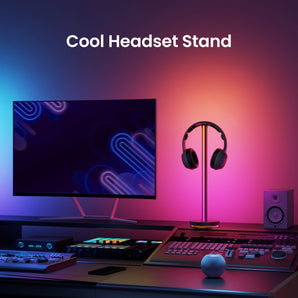
Beam packs dual synchronised RGBIC bars with a headphone holder, 3-sided illumination, and sync with music, screen colours and games, plus app and voice control. A strong centrepiece for a gaming desk.
Cube and Cube Lite
Cube is modular with magnetic pogo pins, clock mode, music/game/screen sync and Matter. A control box and Standard pack are required. Cube Lite is compact for pixel art, clock and text, with Matter, Alexa and Google Home.
Panels and strips
Triangular panels support custom layouts, music sync (even with headphones), Razer Chroma, and Google/Alexa voice control. For strips see Smart LED Strip — Obsid for RGBIC + Matter, Strip Pro for HomeKit + Razer with no hub.
Game sync: which product supports what?
- Razer Chroma: Screen Light Bar Pro, panels, Light Strip Pro, D2, GU10, W3.
- Overwolf: Screen Light Bar Pro.
- Game and screen sync: Beam, Cube, Obsid.
Sync details for each model are on its product page.
Frequently asked questions
What is the best Yeelight gaming light?
It depends on your setup: Beam for dual RGBIC bars with a headset stand and music/screen/game sync; Cube for modular Matter-ready cubes with clock mode; Cube Lite for pixel art with Matter, Alexa and Google Home; triangular panels for music sync and Razer Chroma; strips for wall or TV backlight.
Does Beam include a headset stand?
Yes. Beam comes with dual lights in one pack with a headphone holder, 3-sided illumination, and sync with music, screen colours and games.
Does Cube need a control box?
Yes. Cube requires a control box, at least one Standard pack, and each control box supports up to six Cube lights.
Is there Razer or Overwolf sync?
Yes. Razer Chroma is supported on Screen Light Bar Pro, LED panels, Light Strip Pro, D2, GU10 and W3, and Overwolf on Screen Light Bar Pro. Beam, Cube and Obsid support game and screen sync.
Does Cube Lite support Matter?
Yes. Cube Lite supports Matter, Alexa and Google Home.
Is there a warranty?
Yes — a 2-year agent warranty.