Match gaming lights to the setup you want
Choose between a desk accent, modular lights and a strip behind furniture. Lighting effects and integrations depend on the exact model and software; an RGB product is not automatically a screen-sync or TV-sync device. See How to set up gaming lighting.
Compare gaming-light formats
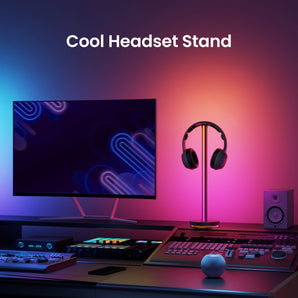
- Beam RGBIC Light Bars: a dual-light setup with a headset stand.
- Cube Lite RGB Pixel Light: a pixel-light option with Matter support.
- Light Strip Pro: an ambient strip option with HomeKit, Google Assistant and Alexa support; choose a matching standard kit before adding extensions.
Check connections and the full kit
Confirm mounting space, power and integration requirements before planning effects. Do not assume a TV USB port can power a strip, or that a strip automatically follows the picture on a television. Match extensions and power equipment to the exact strip model rather than mixing product families.
Frequently asked questions
Does every RGB light follow the TV picture?
No. Check the exact product and any required integration or software. RGB colours alone do not mean a light follows your screen or TV picture.
Can I power Light Strip Pro from a TV USB port?
Do not assume that you can. Use the power requirements and supplied equipment specified for the exact kit.
Can I buy only an extension to start a strip setup?
No. An extension needs the matching standard kit and is not a standalone light strip system.